Showing posts with label customization. Show all posts

17 August, 2011

Guest Post by Jaycie Leishman: Summer

Deviating from my normal routine, this is the first-ever guest post by a fellow 20-something blogger (20SB) friend, Jaycie Leishman from Wellsville, Utah. She has a beautifully simple blog layout with hand-drawn illustrations scattered throughout, which I love, and I was instantly drawn to her writing style. Now, we are swapping blogs for the day! You should go visit her blog for even more of her witty musings, and to see what damage I've done to her blog in my guest post today... ;-)


to some, summer is the greatest part of the year.
snow cones, tanning, swimming, camping. the works!

to a small few [like me] it's the WORST part of the year.
sunburn. sweat. working. allergies. razor burn.

it's not necessarily something i enjoy arguing over, so i thought for my guest post i'd write about something we can all agree on. not to mention, i am my own person, and i don't like to stick to the rules. so we're talking about...(drum roll, please)...

ice cream.

i scream. you scream. we all scream for ice cream. it's the perfect treat no matter the season, and especially in the summer time. i'll be honest, i have fallen head over heels in love with ice cream. it's not only my favorite food group, but it's an art, a passion, sometimes a poison.

you could say that i'm somewhat of an ice cream prodigy. let me explain.

when i started working at Cold Stone in the mid 21st century (aka four and a half years ago), i decided i'd work harder than everyone else until i knew absolutely everything about ice cream. it didn't take long. let's be honest, it's not exactly rocket science.

i know it's terrible quality. that's what i get for using my phone...i'm the smokin' hot one on the right! ;)

i'd spend hours thinking up creations that would knock the socks off people. when normal people slept, i dreamed of ice cream. when normal people ate cereal for breakfast, i stumbled out the door in sub-zero temps with an ice cream treat in one hand, hot chocolate in the other.

my first custom creation: Mint Heaven. (please keep in mind i didn't say i was a writer of witty titles...)
mint and cheesecake ice cream mixed half and half. mixed with oreos and white chocolate chips.
super simple, super amazing. it doesn't sound like much, but try it. you'll see.

after that it became a game. people came in daily without any idea what they want. soon, i could narrow it down by asking four simple questions.

  1. what is your favorite kind of pie? - this is important because it gives me a feel for what kind of sweets they like. my favorite response is, "I don't really like pie."
  2. what are your favorite kind of chips? - this gives me an idea of how their taste palate compares to mine.
  3. chocolate, peanut butter, or fruit? - this helps me determine the sweet things they like.
  4. any allergies or dislikes i should know about? - after all, i'm not going to try to kill my customers.

based on these four questions, i can create a custom creation for any human on the planet, no matter how savage i think they are.
i just have a knack for putting together flavors that just knock the pants off people.
the guarantee: "if you don't like it, i'll make you a new one, free of charge."
let's just say i've never had to recreate an ice cream. and i only give them out free to hot guys who ask for my number, but that has nothing to do with my mixing skills. just my shameless, flirting skills...

my name tag, of course, introduces me as Lord Voldemort.
i was dubbed a wizard by a co-worker, and boy did it stick!
one day i asked him, "why Voldemort?"
his reply, <thoughtfully> "well, Dumbledore and Voldemort are the two greatest wizards, right?"
me, "right."
him, "Well, I figure you'd be more likely to use your powers for evil."

of course Amy and i haven't met. i know pretty much nothing about the girl, other than that she's got some mad skills in the art department, and i haven't asked her the four questions yet. i do, however, have a pretty good idea for an Amy creation.

it would be called The Decadent Amy Dessert.
picture this:
oatmeal cookie batter ice cream.
graham cracker pie crust.
yellow cake pieces.
a spoonful of cherry pie filling. also, a spoonful of apple pie filling, both chopped up a little bit.
a dash of cinnamon.
wrapped up in a warm drizzle of caramel.

(think apple crisp/cobbler, what have you. then times the pleasure factor of that by a million.)

voila! i am a super genius. and for more of my magic, you can find me at jayciepenny.blogspot.com.

---

Thanks, Jaycie, now I have a craving for Cold Stone... either The Decadent Amy Dessert or a Mint Heaven would really hit the spot right now...

Till next time,
Amy

06 March, 2011

The Evil Twitter Twins

Back in September, Twitter began rolling out a sparkly new layout and a few new features to some of its users, and officially completed it in October. Users are still given the option whether to use "old" or "new" Twitter, and I'd personally kept to the old one for a while for a variety of reasons, including my typical resistance to anything my favorite services try to change for the sake of changing (if it ain't broke...) but also because of the "new" version's wider layout, which fills most of the screen horizontally.

Old Twitter

Old Twitter Width

New Twitter

New Twitter Width

The implication is that less of the user's background image will be showing. A little *ahem* background... on Twitter's backgrounds. You basically get three options when designing your Twitter profile's background appearance:

  • solid color (don't use a background image)
  • background image that tiles (repeats vertically and horizontally)
  • background image that doesn't tile and is stuck in the top-left corner of the screen
Twitter Profile Settings Screen

This is a bit different from normal Web pages, which allow you to set a variety of options in HTML and CSS such as whether the image will be centered or stuck to a different side of the screen, whether it will be fixed or scroll with the content, and more. To be fair, most social networks do limit customization in order to maintain some kind of consistency for the user experience. Twitter in particular has always had a very streamlined interface and sometimes an overly-simplified approach to its service. The great thing about getting millions of minds together online though, is that often people will come up with extremely cool ways to work within the provided framework and still show off their creativity.

In the case of Twitter, one of these ways was to create custom background graphics which either reinforced a brand image, pointed to other social networks (Twitter limits you to one hyperlink in your actual profile), or just looked darn cool. There are plenty of nifty "Twitter background" roundups and tutorials floating out there which highlight this trend, but they generally display the narrower layout which provided more real estate for these creative backgrounds.

Now, I had not taken the time to design myself a cool background before this point, and in a way I'm glad I didn't because it's a shame for all the people who did, only to have them hidden today. However, in light of the imminent "You’re using an older version of Twitter that won’t be around for much longer" message posted along the top of every page, I decided that there must be a way to have a cool-looking graphic that fits in the new space provided.

And so, in honor of Spring cleaning, my new MacBook Air, and the design community at large, I put myself up to the challenge.

Thought process:

  • I am not including mobile users, as they would be using mobile Twitter or a third-party application, so they wouldn't see any change in "layout" from old to new or any user's backgrounds at all.
  • For some users, 1024px is the highest resolution their screens will allow. Browsing new Twitter with a 1024px wide window on a normal device, though, means that you have 40px of background real estate on the left, and 40px on the right. Unless you're going to write something at 4pt font size or place your favicon there, I don't see this as being useful. It is practically the smallest resolution you can use in the new Twitter before getting horizontal scrollbars (ick), so I think it's safe to say this resolution will not be our target.
  • Moving on to the next big class of users: 1280px wide screens. Realizing that someone could resize their window a bit smaller even when their maximum resolution was 1280px meant that I wanted a design which could hold up to somewhere between 1024 and 1280, but generally 1280 would become the new standard. This gave me 120px to play with on each side of the screen.
  • The right sidebar in the new Twitter is now slightly transparent. I could do something cool behind there...

Time to sit down and design. Approximately three hours, one drunken roommate, some Pad Thai, and a few bathroom breaks later, I was finally satisfied enough to test my design...

Eureka! The Twitter Twins are Born

Eureka! It worked! My design didn't call for any specific top padding, and I eventually trimmed it down a bit, but I was very happy with how this looked online, how it scaled with the window, and of course, how very "Amy," my new Twitter background was.

Now off to write a how-to reference for the design community on http://color-and-code.com

28 July, 2010

Portfolio Update: JavaScript, CSS, JSON in Action

The inspiration for this portfolio is a brick-and-mortar (or in my case, probably plaster and peeling paint?) art gallery. I was going to go with something that scrolls left and right as if you are walking through, but it felt so... constrained... contrived... limiting. For a portfolio piece, I really wanted something that showcased both my technical knowledge and graphic skill. So I broke out of the shell a bit with this one and made an original mashup of some leading web technologies combined with my own need for an easy-to-edit showcase of my creative work.

Try resizing your browser window and see what happens. Also try dragging some of the artwork around.

An original portfolio design

Now for some technical mumbo-jumbo. Rather than a lightbox for image enlargements, I used a mid-size image to start. I kept it simple and linked to the image's Flickr page which also allows commenting, favoriting, viewing full size etc. for further interaction with the same number of mouse clicks. The page uses Flickr's API to pull my most interesting images from my photostream (JSON), then gets their title and puts it in the little caption area. The rest is some CSS and jQuery magic. The result is I always have an updated, interesting portfolio page which saves me precious time and energy!!! The downside is that with JavaScript disabled there isn't much to see. Note to self: come up with a creative static portfolio asap.

Let me know how you like it in the comments.

21 August, 2009

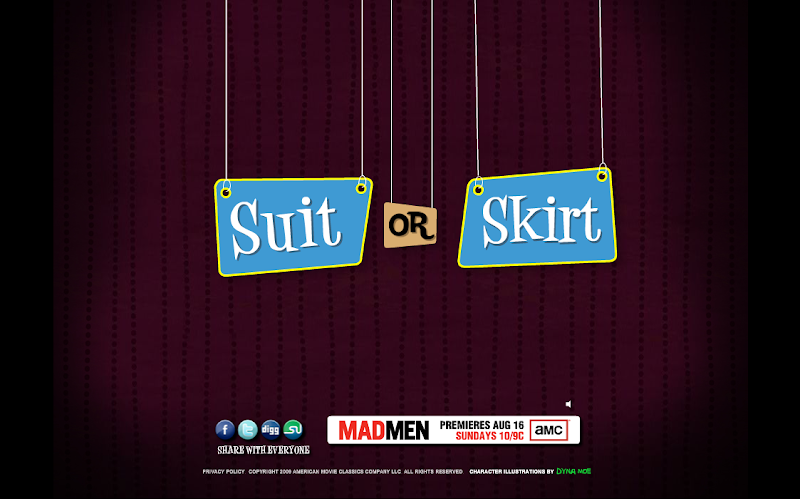
Mad Men Yourself: Implications of the Swanky '60s Style Avatar Creation Site

This post is for anyone interested in Web 2.0 technology, trends in social media, graphic design, the TV series Mad Men, or marketing.

It appears I have a knack for finding new "[Insert Title Here] Yourself" services on the web. These Cartoon-Yourself, Yearbook-Yourself, Elf Yourself, and avatar generators let us show off our tweeting, friending, narcissistic selves as profile pictures without seeming the least bit vain (à la myspace). And darn they're fun to use.

The latest is AMC's "Mad Men Yourself," and this one has an interesting backstory.

In case you don't feel like reading my 20-page "Representing and Misrepresenting Yourself on Social Networks" report about online identity, a little background might help. Mad Men is a television series on AMC, now in its third season, which centers on the high-powered world of Madison Avenue advertising agencies in the 1960's. Think David Ogilvy.

The series quickly developed a following in both real and virtual settings, e.g. Twitter, because it appeals to agency/media/marketing people who also happen to be early adopters of Twitter and other social networks. A lot of these creative-types did some really neat things with the characters on the show, and AMC did some really stupid things and then took it back and a year later, wised up and created the following awesomeness, a perfect reflection of the "brand" that is Mad Men, and the "fans" such as Dyna Moe, who created the illustration for the site:

Skirt or Suit?

Congrats, AMC. You finally "got it," and your show is saved.

PS - Does the music remind anyone else of the old The Sims when you were in "buy" mode? Ahh elevator music. Never goes out of fashion.

PPS - Eight O'Clock Coffee gets a Brand + in my book for a perfect sponsorship deal:

Fueled by Eight O'Clock Coffee logo

24 July, 2009

The Best Social Bookmarking Widget for Blogger

This post is for Blogger users who like custom templates and widgets.

Sometimes, it's hard to be a Blogger user, especially when you see cool features in Wordpress that you can't have, like "related posts" widgets and nifty social bookmarking icons that link up automatically to your post.

Recently, I found this code from cheth Studios, and I installed it to my very own blog.

Social Bookmark Icons

Instead of the "Add This" widget which I used to use (also recommended, easier to install and smaller but uses javascript instead), you can now see all the functioning social icons below each of my posts. So go ahead and e-mail, tweet, bookmark, and share to your heart's desire. It can't get any easier.

Thanks, Cheth!

21 July, 2009

Music Fans: You Need to Sit Back and Listen

This post is for everyone who listens to internet radio and likes free stuff.

Regardless of your music taste, and whether you've settled into your iTunes, your ForumW, your LimeWire, Pandora, or some other way of consuming music, you have to try out last.fm.

last.fm logo

According to their website, "last.fm is a music service that learns what you love" ... and I instantly loved it back. This kind of love doesn't take a lot of effort; it's service is based not only on what you tell it now, but on your past. Meaning that for people who have been listening to music for any more than 5 days out of their lives will appreciate the seamless transition to its online/offline user experience. Borderline creepy-stalker-lover, Last.fm seems to know you as soon as you press the little "import" button on its GUI, updating your profile information to reflect your listening history. It's a good thing real relationships don't have that kind of unforgiving insight.

They also offer personalized music recommendations, some free mp3 downloads, stations based on a specific artist, all kinds of web 2.0 widgets for your blog/website/network, and automatically corrected misspellings of artist and track names. A website that can correct you, the music guru, when you're wrong???! It's creepy but it works. The question is, do you really want a service that works that well... wuahaha...

06 May, 2009

Turning Man's Trash into My Treasure

Found this little gem on the side of the curb by the AEPi House on North Broad Street. They just renovated their mini-mansion so I assume this is an artifact from that process. But it was just too charming for me to pass up.

I was walking back from class with a friend who happened to be on crutches, so I carried it halfway home and then solicited a neighbor's help the rest of the way.

Rescued Cabinet from the Garbage Collectors

My plans for this treasure go a little something like this:

  1. Rescue abandoned side cabinet from the garbage collectors.
  2. Clean and sandpaper the whole thing. Elbow grease!
  3. Purchase the perfect shade of cranberry paint, and clear a space on backyard patio where it's okay to make a mess.
  4. On a sunny afternoon, do a few coats of this lovely cranberry color.
  5. Purchase knobs for the front. I'm thinking either "Celebration" in antique brass or "Native Romance Nonva" in patine.
  6. Do some calligraphy on the sides i.e. Chinese or Japanese characters.
  7. Fill with bottles, books, or some other useful items.
  8. Love.

07 February, 2009

Official Gmail Stickers

This is pretty funny - Google is giving away stickers via snail mail. Send a SASE (self-addressed stamped envelope - when's the last time you heard THAT term?) to:

Send me some Gmail stickers already
P.O. Box 391420
Mountain View, CA 94039-1420

Send it by Feb 14 for some old-school fun!
From Official Gmail Blog: Get your Gmail stickers

PS - THIS IS MY 100th POST! Wowza.

26 January, 2009

Fun with Avatars

Yahoo! Avatars is kinda fun if you're in a distract-me-please kinda mood. The selections are limited but here's what I came up with:

A little Rome-sick, maybe, hehe. Especially with all this cold weather in the States!

19 January, 2009

Frosty Wallpaper

Photo upload from Flickr: Happy Winter
Happy Winter, originally uploaded by whoaitsaimz.
Description: My lil rendering of Frosty. In Blender 3D. Desktop wallpaper. 1280 x 800

I made this desktop wallpaper in a program called Blender 3D. It's perfect for a laptop with 1280 x 800 resolution. Get the full size and right-click, then "set as desktop wallpaper" to make it yours!

Follow this blog - it's easier than stalking and less creepy